
-
Bhangra discussion is still going strong. Join us in our Facebook group!
New user registration has been closed (as it was entirely spam). We encourage you to post in our Facebook group, even if it's a followup to an existing thread. BTF will continue to be archived and hosted here - Saleem
Fl Studio Help :)
- Thread starter LiLSandhu
- Start date

Jabar Jung
New Member
- Messages
- 926
yea

LiLSandhu
Active Member
- Messages
- 1,056
can yuh tell me?Jabar Jung said:


H G
Member
- Messages
- 228
kkkkkkkkkkk this is mine and GSingh's speciality
for the length of the beat, when you press F6, the Step Sequencer opens up (this is where you add the notes), on the top left of the box it'll show -- ... I think you have yours set to 12, so drag it down to 8 or bring it up to 16 and copy the beat.
hopefully that explains it, if not i can pm you a pic of what it should look like
for the length of the beat, when you press F6, the Step Sequencer opens up (this is where you add the notes), on the top left of the box it'll show -- ... I think you have yours set to 12, so drag it down to 8 or bring it up to 16 and copy the beat.
hopefully that explains it, if not i can pm you a pic of what it should look like
LiLSandhu
Active Member
- Messages
- 1,056
ahahhah thanks for this but thas naw what i was talking aboutH G said:kkkkkkkkkkk this is mine and GSingh's speciality
for the length of the beat, when you press F6, the Step Sequencer opens up (this is where you add the notes), on the top left of the box it'll show -- ... I think you have yours set to 12, so drag it down to 8 or bring it up to 16 and copy the beat.
hopefully that explains it, if not i can pm you a pic of what it should look like
like i have this bassline thing and it is 12 beats and i want it to be 8.
so when i play the beat in the pattern thing the bassline overlaps it and sounds retarded
i fixed this a while ago but i dont remember how i did it
sorry if this isnt making any sense

LiLSandhu
Active Member
- Messages
- 1,056
alriii
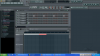
so look at the picture and listen to the clip i attached of the beat
i dont know how to explain it
the bass beat in Fl Studio is like 12 beats long and the beat im making is 8 beats long
so when it it is Pattern Mode the 4 beats that are left from the bassline come again in the start of the beat.
i dont know if it makes sense but try listening to the clip and looking at the picture.
so look at the picture and listen to the clip i attached of the beat
i dont know how to explain it
the bass beat in Fl Studio is like 12 beats long and the beat im making is 8 beats long
so when it it is Pattern Mode the 4 beats that are left from the bassline come again in the start of the beat.
i dont know if it makes sense but try listening to the clip and looking at the picture.
Attachments
-
 484.8 KB Views: 23
 -
702.1 KB Views: 86
H G
Member
- Messages
- 228
Here's 2 versions of the bassline you sent, 1 is 8 beats, the other is 16, I'm not sure if you wanted to still use all of the bassline for it.
Lemme know if either one works...if not, I can probably make you a new one
Lemme know if either one works...if not, I can probably make you a new one
Attachments
-
377.7 KB Views: 108
-
753.2 KB Views: 102
H G
Member
- Messages
- 228
lol wtffff, want a new one?LiLSandhu said:ahah thanks for that but it stilll isnt workingg the smae shyt keeps happpening
LiLSandhu
Active Member
- Messages
- 1,056
ahahahah leave itH G said:lol wtffff, want a new one?LiLSandhu said:ahah thanks for that but it stilll isnt workingg the smae shyt keeps happpening
illl try figuring it outt
thanks for all the help homie

anooj3434
New Member
- Messages
- 99
i think i understand what ur saying. if the bassline is 12 beats long, then its gonna overlap unless u make the beat 12 beats. If you want the bassline to cut off and start again after 8 beats, then i'd say take it into acid and cut it to 8 beats and then put it back into fl studio.
H G
Member
- Messages
- 228
I did that, but for some reason the same problem kept happeninganooj3434 said:i think i understand what ur saying. if the bassline is 12 beats long, then its gonna overlap unless u make the beat 12 beats. If you want the bassline to cut off and start again after 8 beats, then i'd say take it into acid and cut it to 8 beats and then put it back into fl studio.

dj2nyce
Facebook.com/TheOfficial2NyCe
- Messages
- 854
2nyce to the rescue
1) click on the name "bassline" so the channel settings show up
2) go to the "INS" tab
3) look at the nobs under the TIME envelope...(DEL, ATT, HOLD, DEC, SUS, REL)
4) make del 0, att 0, dec 0, sus 0, and rel 0
5) the only one u have left now is "hold"...experiment and make the nob more or less until it stops at exactly 8 counts
i know thats not the professional way but basically its a time envelope and if u do what i told u to ur killing the attack and the sustain and all that by making them 0 and the hold is simply how much of the sound plays....so if u make it very small ull hear a fraction of ur bassline, make it long ull hear the whole thing..and if u find somewhere in between where it stops at 8 itll be what ur lookin for
hope that helps
1) click on the name "bassline" so the channel settings show up
2) go to the "INS" tab
3) look at the nobs under the TIME envelope...(DEL, ATT, HOLD, DEC, SUS, REL)
4) make del 0, att 0, dec 0, sus 0, and rel 0
5) the only one u have left now is "hold"...experiment and make the nob more or less until it stops at exactly 8 counts
i know thats not the professional way but basically its a time envelope and if u do what i told u to ur killing the attack and the sustain and all that by making them 0 and the hold is simply how much of the sound plays....so if u make it very small ull hear a fraction of ur bassline, make it long ull hear the whole thing..and if u find somewhere in between where it stops at 8 itll be what ur lookin for
hope that helps
LiLSandhu
Active Member
- Messages
- 1,056
thank you brooo(L)2nyce said:2nyce to the rescue
1) click on the name "bassline" so the channel settings show up
2) go to the "INS" tab
3) look at the nobs under the TIME envelope...(DEL, ATT, HOLD, DEC, SUS, REL)
4) make del 0, att 0, dec 0, sus 0, and rel 0
5) the only one u have left now is "hold"...experiment and make the nob more or less until it stops at exactly 8 counts
i know thats not the professional way but basically its a time envelope and if u do what i told u to ur killing the attack and the sustain and all that by making them 0 and the hold is simply how much of the sound plays....so if u make it very small ull hear a fraction of ur bassline, make it long ull hear the whole thing..and if u find somewhere in between where it stops at 8 itll be what ur lookin for
hope that helps
that solved the problem
dj2nyce
Facebook.com/TheOfficial2NyCe
- Messages
- 854
no problem...if you, or anyone, has anymore questions i would say inbox me... but just so other people can learn post it up as a topic and inbox me the link and ill get back asapLiLSandhu said:thank you brooo(L)2nyce said:2nyce to the rescue
1) click on the name "bassline" so the channel settings show up
2) go to the "INS" tab
3) look at the nobs under the TIME envelope...(DEL, ATT, HOLD, DEC, SUS, REL)
4) make del 0, att 0, dec 0, sus 0, and rel 0
5) the only one u have left now is "hold"...experiment and make the nob more or less until it stops at exactly 8 counts
i know thats not the professional way but basically its a time envelope and if u do what i told u to ur killing the attack and the sustain and all that by making them 0 and the hold is simply how much of the sound plays....so if u make it very small ull hear a fraction of ur bassline, make it long ull hear the whole thing..and if u find somewhere in between where it stops at 8 itll be what ur lookin for
hope that helps
that solved the problem
LiLSandhu
Active Member
- Messages
- 1,056
wheres the stretch button :-[GSingh said:An easier way would be to put the bassline on the trackpad (idk what to call it lol) and then make sure "stretch" is unchecked. from there, reduce ur snap to about 1/4 beat and shorten the sample till it matches the length of the beat.

GSingh
Well-Known Member
- Messages
- 1,469
LiLSandhu said:wheres the stretch button :-[GSingh said:An easier way would be to put the bassline on the trackpad (idk what to call it lol) and then make sure "stretch" is unchecked. from there, reduce ur snap to about 1/4 beat and shorten the sample till it matches the length of the beat.
